

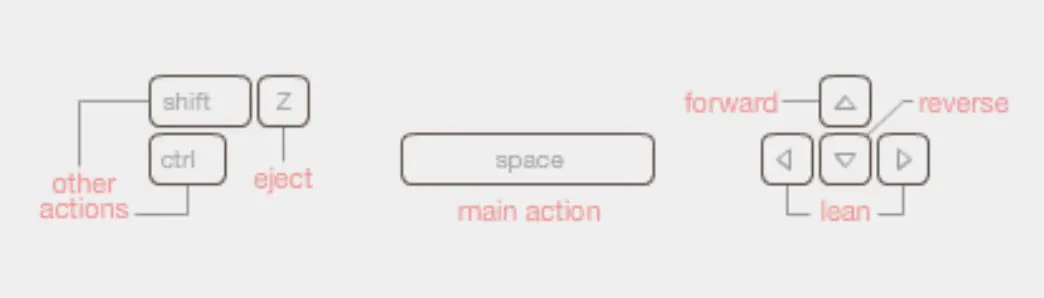
Control Keys:
Happy Wheels – Ride Through Crazy Obstacle Courses and Survive Dangerous Traps
Happy Wheels is a side-scrolling obstacle game where you control unusual characters riding bicycles, wheelchairs, scooters, and other vehicles. Your goal is to travel through dangerous levels without crashing into traps or losing control of your character.
The game features unpredictable movements, challenging obstacles, and exaggerated cartoon injuries.
Each character has different abilities, which makes the levels feel different depending on whom you choose.
Some challenges require careful driving, while others focus on jumping, balancing, or finding a way through a dangerous course.
Choose From Different Characters
Happy Wheels includes several playable characters with unusual vehicles.
Segway Guy rides a two-wheeled electric scooter that can jump.
Irresponsible Dad travels on a bicycle with his young son.
Wheelchair Guy uses a wheelchair equipped with powerful rocket boosters.
You can also play as Pogo Stick Man, Effective Shopper, and other characters.
Each one handles obstacles differently.
Some characters move quickly, while others require more careful balance.
Certain levels only allow a specific character.
Explore Dangerous Obstacle Courses
Happy Wheels features many different levels with unusual challenges.
You may need to ride across narrow bridges, jump over large gaps, or travel through areas filled with dangerous objects.
Spinning saws, sharp spikes, mines, and falling obstacles can stop your progress.
Some levels also contain moving platforms or objects that require careful timing.
The game uses realistic-style movement physics, so your character reacts to bumps, crashes, and sudden changes in direction.
A small mistake can cause your vehicle to overturn.
How to Play Happy Wheels
Use the Up Arrow to accelerate.
Press the Down Arrow to slow down or move backward.
The Left and Right Arrow keys help your character lean backward or forward.
Press Spacebar to use a character’s special ability.
The Shift and Ctrl keys provide additional actions for certain characters.
Use Z to leave your vehicle.
Press R to restart a level after a crash.
The controls may work differently depending on the character you choose.
Try Player-Created Levels
One of the biggest features of Happy Wheels is its collection of custom levels.
Players can create their own obstacle courses and share them with others.
These levels include races, difficult jumps, survival challenges, and unusual puzzles.
Some courses require you to reach a finish line.
Others challenge you to collect objects or complete a particular task.
You can explore different levels and discover new obstacles created by other players.
Create Your Own Obstacle Course
Happy Wheels also includes a level editor.
You can use it to place platforms, ramps, vehicles, and dangerous traps.
You can create moving objects and design different types of challenges.
The editor allows you to test your course before sharing it with other players.
Try building a simple track first and then adding more difficult obstacles.
Tips for Surviving Longer
Start by learning how your chosen character moves.
Avoid accelerating too quickly near narrow platforms or dangerous objects.
Use the leaning controls to maintain balance during jumps.
Watch the road ahead and slow down when approaching unfamiliar obstacles.
Practice difficult sections to understand how your vehicle reacts.
Happy Wheels combines challenging movement with unusual characters and creative obstacle courses. Its unpredictable crashes and exaggerated injuries are part of the experience. The game contains graphic cartoon violence, so it is more suitable for older players than young children.